
Section
Fair Go Casino on Mobile
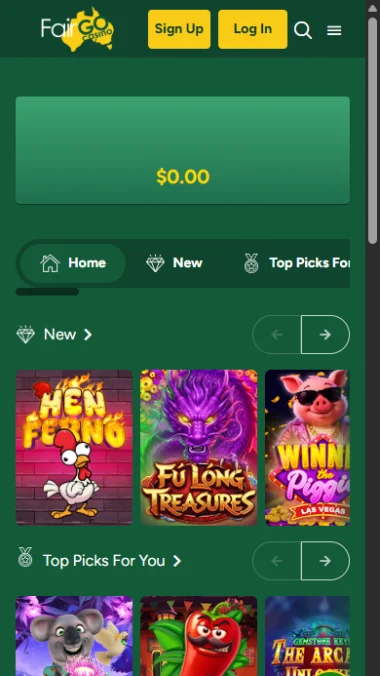
The full lobby in any modern mobile browser, with the cashier pinned to the bottom of the screen. Add it to your home screen and it opens like an app.
- App Store
- Nothing
- Google Play
- Nothing
- Game library
- Full, same as desktop
- Install size
- Zero
Mobile at a glance
Better than desktop at the things people actually do on a phone, and there is nothing to install.
Included
- The full lobby, not a reduced selection.
- Deposit, Promo, Banking and Sign Up pinned to a fixed bottom bar, which is faster than the desktop menu.
- Add to Home Screen gives an icon and a full-screen window with nothing downloaded.
- Apple Pay and Google Pay remove card typing entirely.
- Assets cache after the first load, so return sessions are quick on mobile data.
Good to know
- No app in either store, so no push notifications and no store-verified download.
- Reading paytables and bonus terms is cramped on a small screen.
- Only two to three games visible at once against eight or nine on desktop.
- Fake APKs exist. Anything offering a Fair Go download on Android is not the casino.
Use it for depositing and for playing games you already know. Use desktop for browsing the catalogue and reading terms. That split plays to what each is actually good at.
Why there is no app
Apple and Google both restrict real-money gambling apps to operators licensed in specific jurisdictions, require separate approval for each country of distribution, and generally require the developer account to belong to the licensed operator itself.
For an offshore casino serving Australia, that combination is effectively closed. The result is consistent across the sector rather than particular to this brand, and the browser route is genuinely not a compromise: modern mobile browsers run the same games at the same quality.
It also has a useful consequence. Because no legitimate app exists, anything presenting itself as one can be dismissed without further thought.
Installing it to your home screen
Fifteen seconds, nothing downloaded, and it gives an icon plus a session that survives far longer than a browser tab.
Open the casino in Safari on iPhone or Chrome on Android
On iOS this only works in Safari; Chrome for iPhone cannot create a home screen web app.
Log in first
The shortcut inherits the session, so it opens straight into your account afterwards.
Open the share or menu button
The square with an arrow on iPhone, the three dots on Android.
Choose Add to Home Screen
Android may call it Install app depending on the Chrome version.
Confirm the name
Shorter names display better under the icon.
Mobile against desktop
| Mobile browser | Desktop | |
|---|---|---|
| Game library | Full | Full |
| Reaching the cashier | Two taps from anywhere | Menu, then a tab |
| Games visible at once | Two to three | Eight or nine |
| Reading a paytable | Cramped | Comfortable |
| Live chat | Same | Same |
| Staying logged in | Better with a home screen shortcut | Standard browser session |
The part worth being honest about
A phone removes every natural stopping point. Desktop sessions have a beginning and an end because you sit down and get up. Mobile sessions have neither, and a Deposit button pinned to the bottom of the screen is two taps away at all times.
That is good product design from the operator’s side and worth being conscious of from yours. The countermeasures are practical: a deposit limit in the account settings, a payment method with friction such as Neosurf, and an operating-system time limit through Screen Time on iOS or Digital Wellbeing on Android.
None of that prevents you playing. It moves the decision to a moment when you are making it clearly.
Frequently asked questions
- Is there a Fair Go Casino app?
Not in the App Store or Google Play. The casino runs in a mobile browser and can be added to your home screen for an icon and a full-screen window.
- Can I download an APK for Android?
No official one exists. Anything offering a download did not come from the operator and is a genuine security risk.
- Do I get fewer games on mobile?
No. The browser version serves the same lobby as desktop.
- Which browser works best?
Chrome on Android, which the operator itself recommends. Safari on iPhone, because it is the only iOS browser that can install a home screen web app.
- Why do I keep getting logged out on my phone?
Cookie handling, nine times out of ten: a private tab, a browser that wipes cookies on close, or a tracking blocker. Installing the shortcut usually settles it.
- How much data does it use?
Very little after the first load. Game assets download once and then only spin outcomes travel, which is far less than video streaming.